♡ Pixorate - A Decorating Game ♡: Make a Cozy Room
Build a tiny dream bedroom, then rearrange it when inspiration strikes.
Share ♡ Pixorate - A Decorating Game ♡
More games
New Games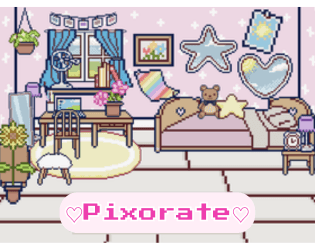
♡ Pixorate - A Decorating Game ♡
Midnight Ramen: Anomaly Watch

gas-station
Idle Brick Breaker
Oharai Ghost Cleaning / 霊清掃会社オハライ
Discover More


Related games
Rogue Metroidvania

Sprunki Phase 9: Remastered
2048

Parasite (Incredibox Mod)

Full Stop Punctuation

Slap Corruptor

Sprunki Phase 7 Big Update

Sprunki Pokemon Phase 3

Spunky Incredibox

ZOMBIE LAST MILES
What is ♡ Pixorate - A Decorating Game ♡?
♡ Pixorate - A Decorating Game ♡ is a cute bedroom decorating game made in Scratch. Place furniture, plants, wall items, flooring, and other decor, then adjust your room until it feels right.
How to play ♡ Pixorate - A Decorating Game ♡
Start decorating
Press the green flag to start. Use keys 1–5 to open the wall, furniture, plants, decor, and floor categories, then click item icons to place things.
Tweak your room
Click the background to change its color. Click an item to change its color, direction, or form, and hover over it while pressing Up or Down to resize it.
Move and rotate items
Hover over an item and press R to rotate it. Press T to toggle precise placement, and avoid overlapping items while placing, resizing, or rotating them.
Clean things up
Press D to enable deleting, then drag an item over the trashcan. Hover over wall trim or flooring and press X to remove it, or press Space to clear the room.
Hide the interface
Press C to hide the UI and trashcan, or press M to show them again. The trashcan itself can be dragged.
Handy decorating tips
Open the menus
The five item categories are accessed with number keys 1–5, covering wall, furniture, plants, decor, and floor items.
💡Try the number keys before clicking around the menu.
Place items precisely
Press T to toggle precise placement when moving items. Keep objects from overlapping while placing, resizing, or rotating them.
💡Use precise placement for tighter layouts.
Make room for changes
Press D to enable deleting, then hover an item over the draggable trashcan. Wall trim and flooring can be removed with X.
💡Drag the trashcan somewhere convenient before editing.
Why play it?
Make a cute bedroom
Arrange a small room with furniture, plants, flooring, wall items, and decor.
Tinker with the details
Change colors, directions, forms, sizes, and rotations until the layout looks right.
Keep it cozy
This short, relaxing decorating game lets you focus on arranging your room without a listed score or timer.
Play in your browser
Jump straight into ♡ Pixorate - A Decorating Game ♡ through your browser without installing anything. The game is listed as an HTML5 experience played with a keyboard and mouse.
Frequently asked questions
Q:How do you control ♡ Pixorate - A Decorating Game ♡?
Use the keyboard and mouse. Number keys 1–5 open the decorating categories, while clicking places items and keys such as R, T, C, M, D, E, X, and Space handle different room-editing actions.
Q:What do you do in ♡ Pixorate - A Decorating Game ♡?
You decorate a bedroom by placing and changing furniture, plants, wall items, flooring, and other decorations. There is no stated score, timer, or required completion state.
Q:Does the game save your room?
No. The game explicitly has no saves, so your decorating setup will not be stored.
Q:Can you hide the UI?
Yes. Press C to hide the UI and trashcan, then press M to make them visible again.
Game features
Five decorating categories
Switch between wall, furniture, plants, decor, and floor menus with the number keys 1–5.
Customize every corner
Change the background color, modify placed items, resize them, rotate them, and position them precisely.
A tiny Scratch creation
The game was made in Scratch, with art and code by the creator.
No saves
There are no save files, so your room is a fresh decorating project each time.