





Welcome To The Garden – Chill Puzzle Game of Nature and Discovery
Play Welcome To The Garden instantly in your browser - No download required!
Share Welcome To The Garden with Friends!
Discover More Welcome To The Garden

Welcome To The Garden

Office Fury

Trees Hate You

Tetrix Online

Ship Smasher

Maptap

School Fury

Statle

Duck Life 4

Meowdoku

Angry Birds
Explore Other Exciting Games

10000 Player Chess

Kick the Buddy

Horse Magnifier
Sprunki Abgerny

Sprunki Playtime

Sprunki Goofin

Red Face Horror

Sprunki Pyramixed V0.9

Sprunki Version Mostard

Spruined 1996 Ocs
What Is Welcome To The Garden?
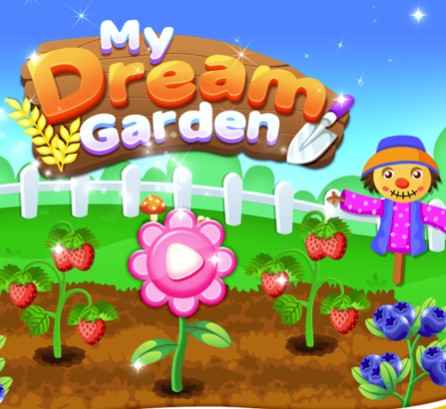
Welcome To The Garden is a laid-back puzzle sim where you tend to your own little patch of nature, piece things together, and uncover surprises hidden among the leaves and petals. Think cozy gardening vibes meets light brain-teasing — the kind of game you can leave running while you sip coffee. It rewards curiosity over reflexes, so poking around is basically the whole point.
How To Play Welcome To The Garden
Start With A Seed
You begin with a small plot and a handful of basic tools. Just click around to interact with your garden space and figure out what's growable.
Solve Garden Puzzles
Puzzles pop up as you tend your plot — match patterns, arrange pieces, or figure out what a plant needs to thrive. Nothing punishing, just satisfying.
Plant And Tend
Place seeds, water them, and watch your garden slowly fill in. Different plants unlock different puzzle hooks as your garden grows.
Explore And Discover
Click on rocks, bushes, and corners you haven't checked yet. There's always a little secret tucked somewhere for the curious player.
Unlock New Areas
Progressing through puzzles and growing your plot opens up fresh garden zones with new mechanics and surprises to find.
Tricks and Tips
Exploration Wins
Click on literally everything in your garden — fences, pots, weird rocks. The game hides unlocks behind curiosity more than skill.
💡Sweep your cursor across every new area before moving on.
Puzzle Patience
Most puzzles have a logical pattern once you spot it. Rushing clicks usually makes things harder than they need to be.
💡Step back, look at the whole board, then plan your moves.
Plant Priority
Some plants unlock puzzle types or new garden areas. Focus on growing those first rather than decorating.
💡Check what each new seed actually unlocks before planting.
Browser Optimization
If things feel sluggish, close other tabs and pause background apps. A clean browser makes the animations noticeably smoother.
💡Hard refresh with Ctrl+Shift+R if visuals glitch out.
Jump Straight In, No Install Needed
Welcome To The Garden loads right in your browser tab — no Steam, no app store, no waiting on a download bar. Click, play, grow your garden. It's the easiest way to get your cozy gaming fix on any computer.
Welcome To The Garden FAQ
Is Welcome To The Garden free to play?
Yep, the browser version is completely free. No paywall, no account required to jump in.
Do I need to download anything?
Nope. It's built to run straight from your browser with no installs, no plugins, no fuss.
What kind of game is Welcome To The Garden?
It's a cozy puzzle sim hybrid — you grow a garden while solving gentle puzzles and exploring at your own pace.
Is it good for relaxing after work?
Honestly, it's perfect for that. The pacing is slow, there's no combat, and it's basically a digital herb garden for your brain.
Do I need good hardware to run it?
It's a lightweight browser game, so it'll run on basically anything — old laptops, school Chromebooks, even a sluggish phone browser.
Can I play offline?
Once it's loaded in your tab, you can usually keep playing without internet. Your first visit needs a connection though.
Does Welcome To The Garden have time limits?
No timers on the puzzles, no rush mechanics. Take a bathroom break, come back, your carrots aren't going anywhere.
Is this game kid-friendly?
Totally. The visuals are gentle, the puzzles are easy to grasp, and there's nothing scary or violent in sight.
How long is the game?
It depends how completionist you get. Casual players can enjoy a session in 20 minutes; explorers might poke around for hours.
Will it save my progress?
Your garden should keep its state during a session. Treat it like a chill visit rather than a save-heavy RPG.
What devices can I play on?
Any modern browser works — desktop, laptop, Chromebook, tablet. Mobile browsers can handle it too on smaller screens.
Are there any microtransactions?
The browser version sticks to its free-to-play roots without pushing premium currencies at you.
Is this the same as the board game?
No, totally different. The board game Welcome To Your Perfect Home is a roll-and-write, while this is a cozy sim puzzler.
Can I play on a school computer?
Because it's a light browser game with no downloads, it usually slips through fine. Just don't tell your teacher we said that.
Features Worth Mentioning
Calm, Cozy Vibe
No timers breathing down your neck, no fail states. The whole game runs on the warm fuzzy feeling of watching things bloom.
Puzzle + Sim Mashup
Garden sim mechanics blend naturally with light puzzle-solving, so you're always doing something without it ever feeling grindy.
Charming Art Style
Soft colors, rounded shapes, and a sun-soaked palette that makes your screen feel like a window into a quiet greenhouse.
Hidden Discoveries
Every garden corner seems to hold a secret plant, object, or puzzle reward. Exploration is genuinely rewarded here.
Plays Right In Browser
Skip the downloads and the store pages — it runs straight from your browser tab in seconds.
Why You'll Love Welcome To The Garden
Genuinely Stress-Free
No pressure, no enemies, no clock ticking down. Just you and your little patch of green making slow, satisfying progress.
Puzzles That Feel Good
The brain teasers are light enough to relax with but interesting enough that you actually want to solve them.
A Garden You Build Yourself
Watching your plot transform from bare dirt into a blooming space never gets old. Every plant is a tiny achievement.
Rewards For The Curious
Clicking on stuff actually pays off. Hidden corners, surprise plants, secret puzzles — the game loves the nosy player.
Perfect Background Game
It's the ideal thing to have open in another tab while listening to a podcast or winding down before bed.